Account Analyst

An Account Analyst using Tally ERP software plays a crucial role in extracting, analyzing, and interpreting financial data to generate actionable insights and detailed reports.
Customize


Real-Time Tally Data Analytics on the Cloud

Account Analyst Dashboard

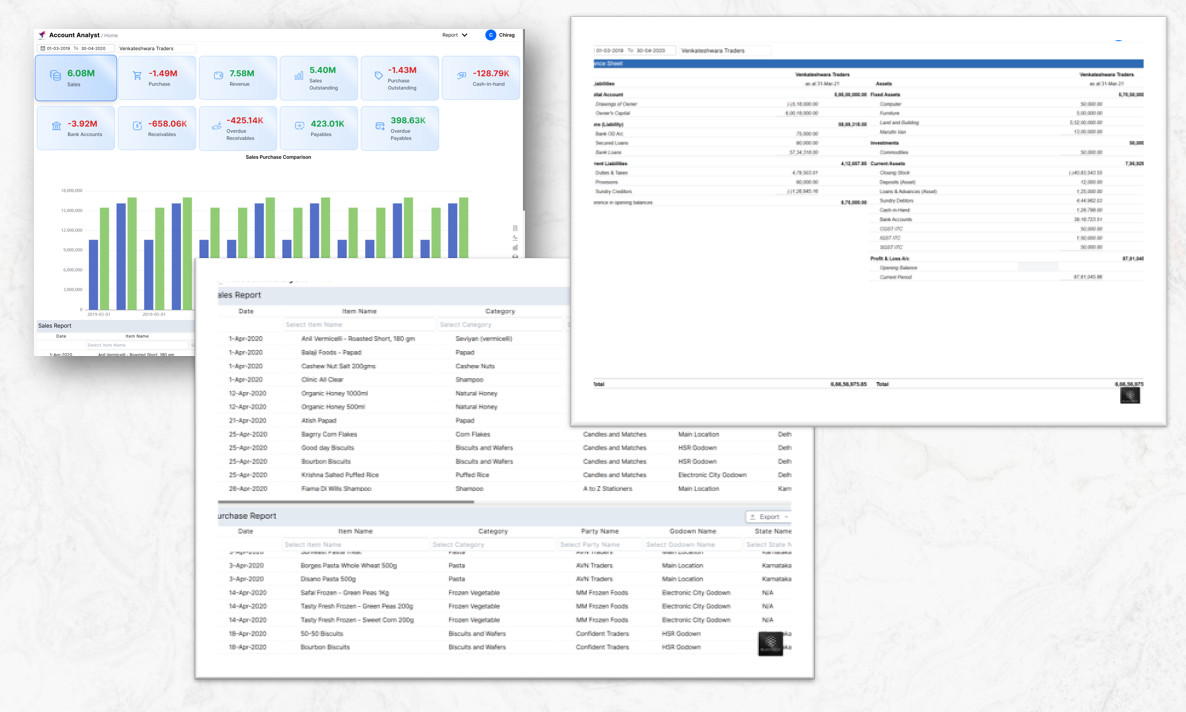
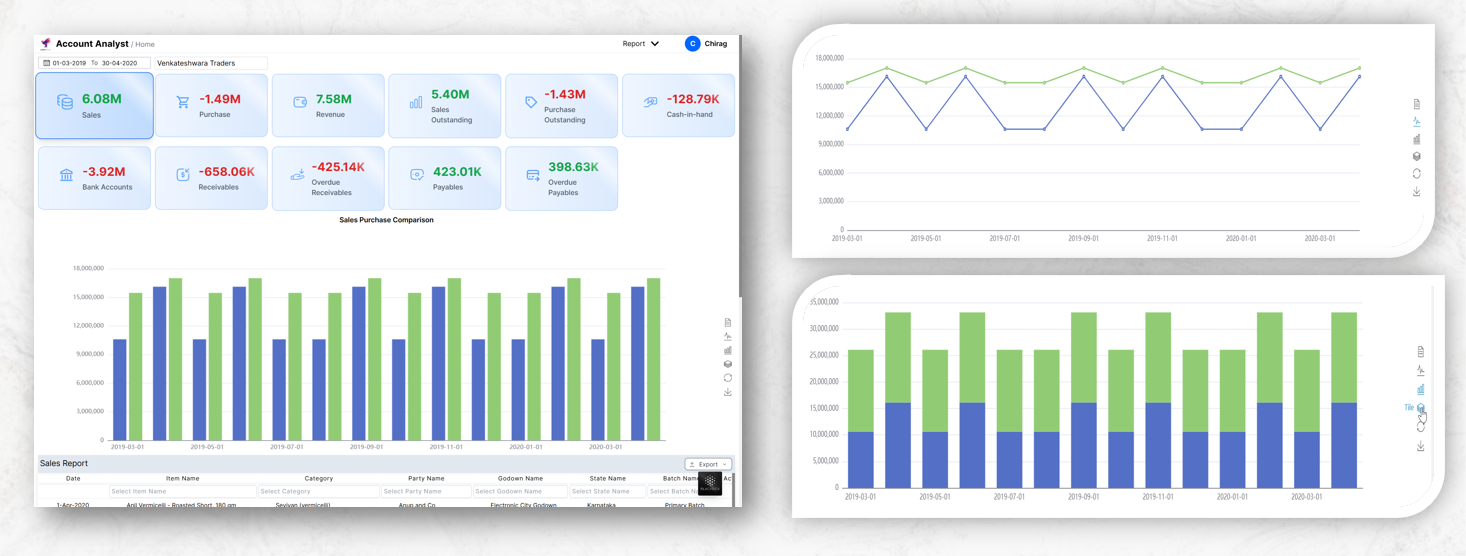
A financial analytics dashboard providing real-time insights into sales, purchases, revenue, and outstanding balances. The system tracks key metrics and generates comparative reports for business decision-making.
Chart Visualization

  • Line chart view for trend analysis
  • Bar chart view for comparisons
  • Stack chart view for composition

Key Benefits

Real-time data synchronization
Secure cloud infrastructure

Report Details

Available Report Types

  • Sales Report - Detailed transaction records
  • Purchase Report - Vendor and inventory data

Export Reports

Click the export button to download reports in your preferred format:
Excel Format
PDF Format

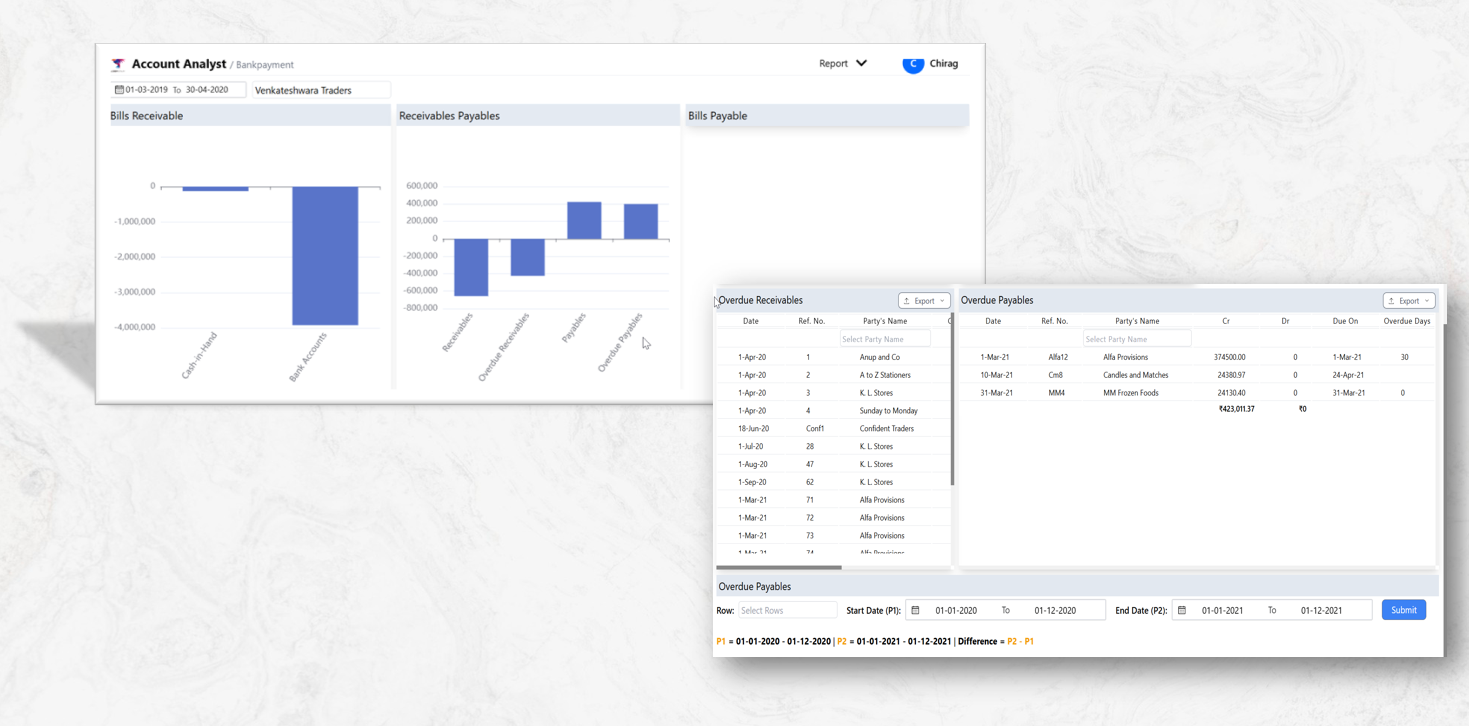
Bank payment details

Better Financial Tracking & Reporting

  • Keeps a record of all bank transactions for audits and compliance
  • Helps in cash flow management and reconciliation

Improved Vendor & Supplier Relationships

  • Ensures timely payments, enhancing trust with vendors and suppliers
  • Helps in negotiating better payment terms

Reduces Manual Errors & Paperwork

  • Eliminates the need for manual entry of bank details
  • Reduces processing delays and payment mismatches

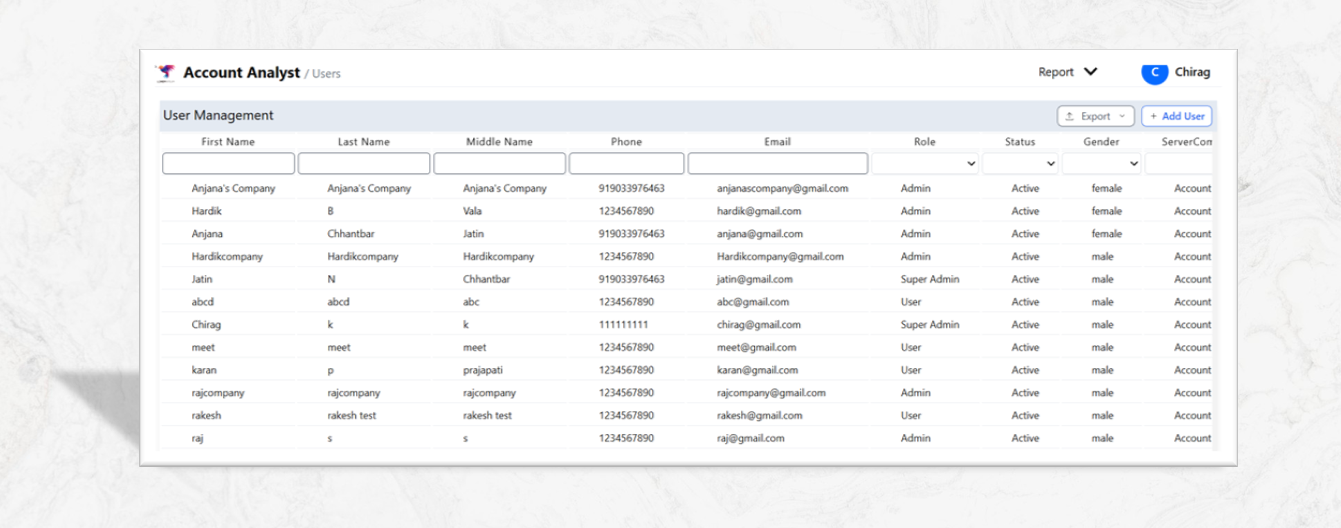
User Management

Enhanced Security & Access Control

  • Restricts unauthorized access to sensitive data
  • Implements role-based access control (RBAC) for better security

Improved Efficiency & Productivity

  • Provides a structured way to assign roles and responsibilities
  • Reduces administrative overhead by automating user access

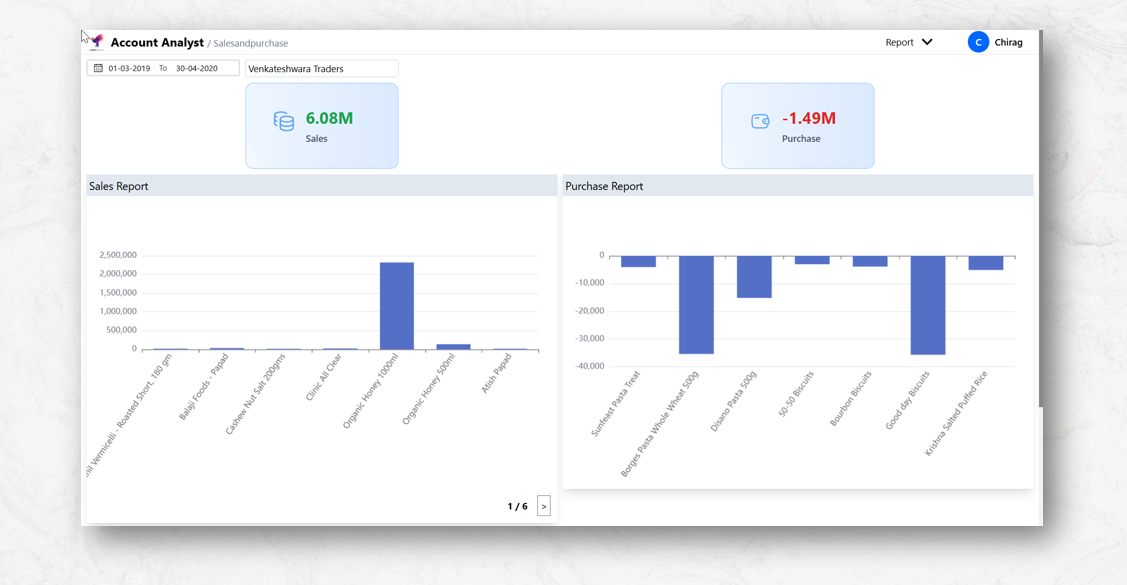
Sales and Purchase report and graf

Better Financial Analysis

  • Provides a clear view of revenue vs. expenses
  • Helps in tracking profit margins and cost efficiency

Real-Time Performance Tracking

  • Monitors sales trends over time to identify peak seasons
  • Tracks purchase patterns to optimize procurement

Improved Inventory Management

  • Helps in stock planning by identifying fast-moving and slow-moving items
  • Prevents overstocking or stockouts, reducing storage costs

Data-Driven Decision-Making

  • Helps businesses adjust pricing, promotions, and marketing strategies
  • Supports better budgeting and cost control

Enhanced Supplier & Vendor Relations

  • Tracks purchase history to negotiate better deals with suppliers
  • Ensures timely reordering and prevents supply chain disruptions

Customer Behavior Insights

  • Identifies top-selling products and customer preferences
  • Helps in designing targeted marketing campaigns

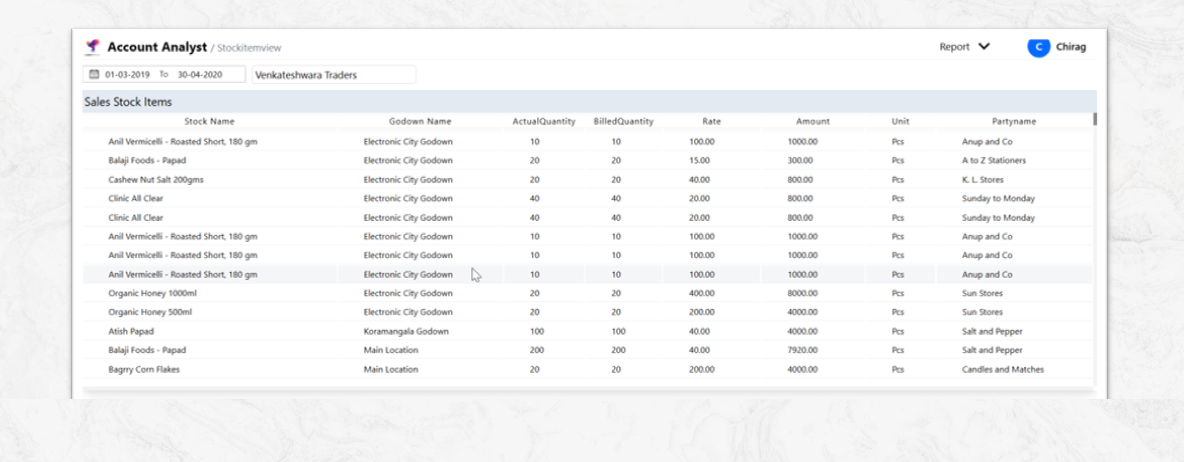
Stock Item View

Real-Time Stock Monitoring

  • Displays current stock levels for each item
  • Helps avoid stockouts and overstocking

Better Inventory Control

  • Tracks stock movement (inward and outward)
  • Helps identify fast-moving and slow-moving items

Accurate Demand Forecasting

  • Analyzes sales trends to predict future demand
  • Helps in better procurement planning

Improved Order Management

  • Ensures stock availability for customer orders
  • Reduces delays in fulfillment and improves customer satisfaction

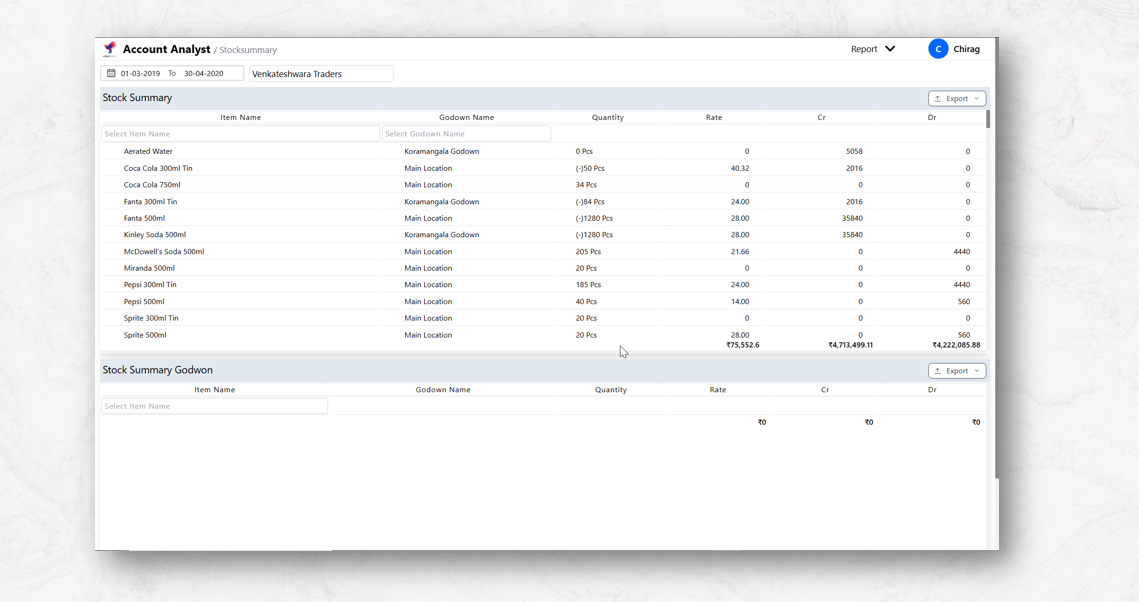
Stock Summary

Real-Time Inventory Tracking

  • Shows available stock, stock-in, and stock-out details
  • Prevents stock shortages and overstocking

Improved Decision-Making

  • Helps determine which products are in high demand
  • Aids in purchasing and restocking decisions

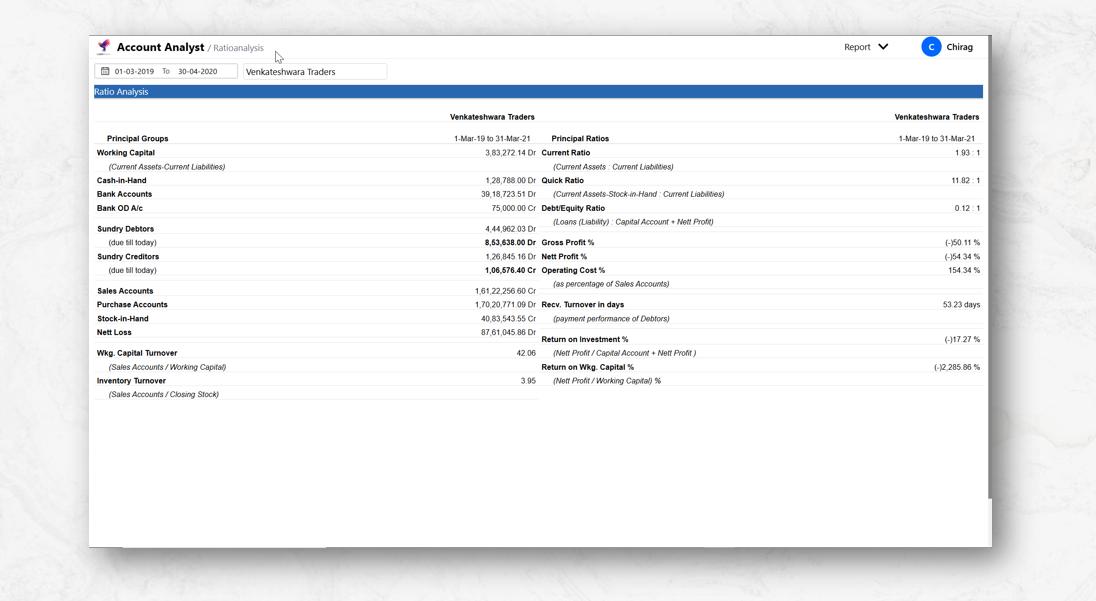
Ratio Analysis

Financial Performance Evaluation

  • Helps assess the overall health of a business
  • Provides a clear picture of profitability, liquidity, and efficiency

Informed Decision-Making

  • Aids management in making strategic decisions
  • Helps identify financial strengths and weaknesses

Comparative Analysis

  • Enables comparison with industry benchmarks
  • Facilitates trend analysis over time periods

Negative Stock

Sales Continuity

  • Process sales even with delayed stock updates
  • Avoid order cancellations from temporary mismatches

Customer Experience

  • Handle backorders during stock shortages
  • Maintain customer satisfaction during supply delays

Inventory Insights

  • Real-time visibility of demand vs available stock
  • Data-driven stock replenishment planning

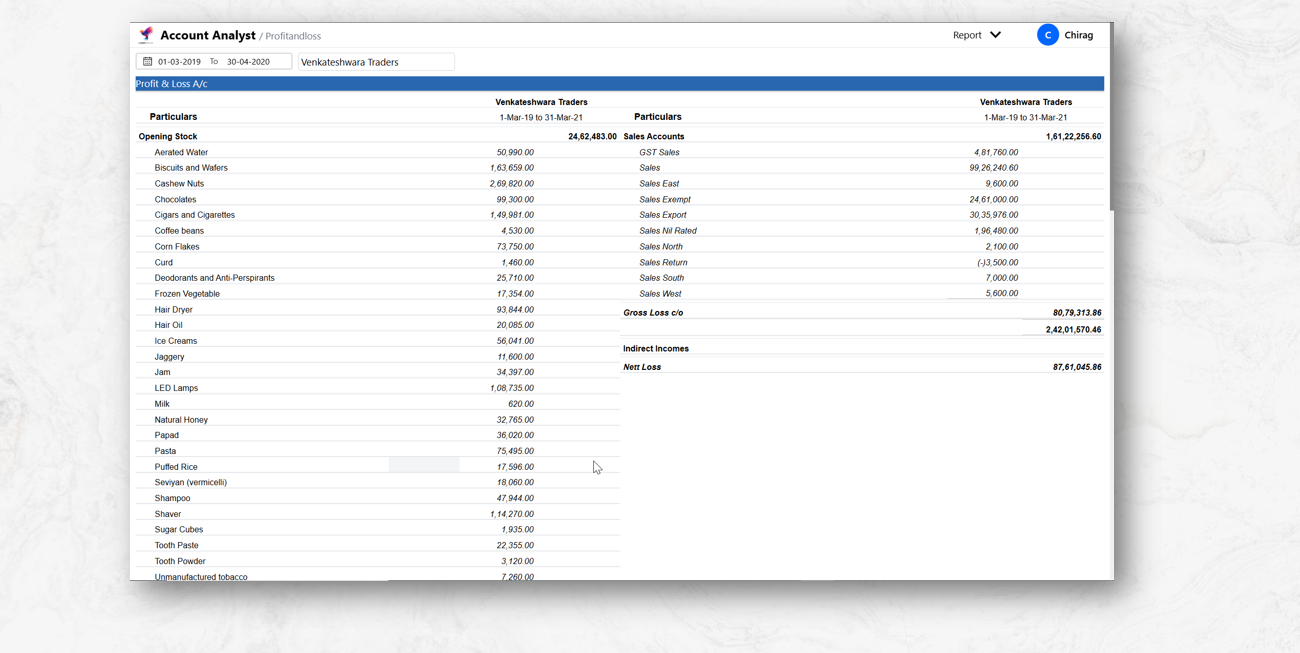
Profit and Loss A/C reports and Data

Financial Performance Analysis

  • Shows revenue, expenses, and net profit/loss over specific periods
  • Tracks financial growth and profitability trends

Strategic Decision Making

  • Assists in budgeting and cost-cutting strategies
  • Guides pricing decisions and expense control measures

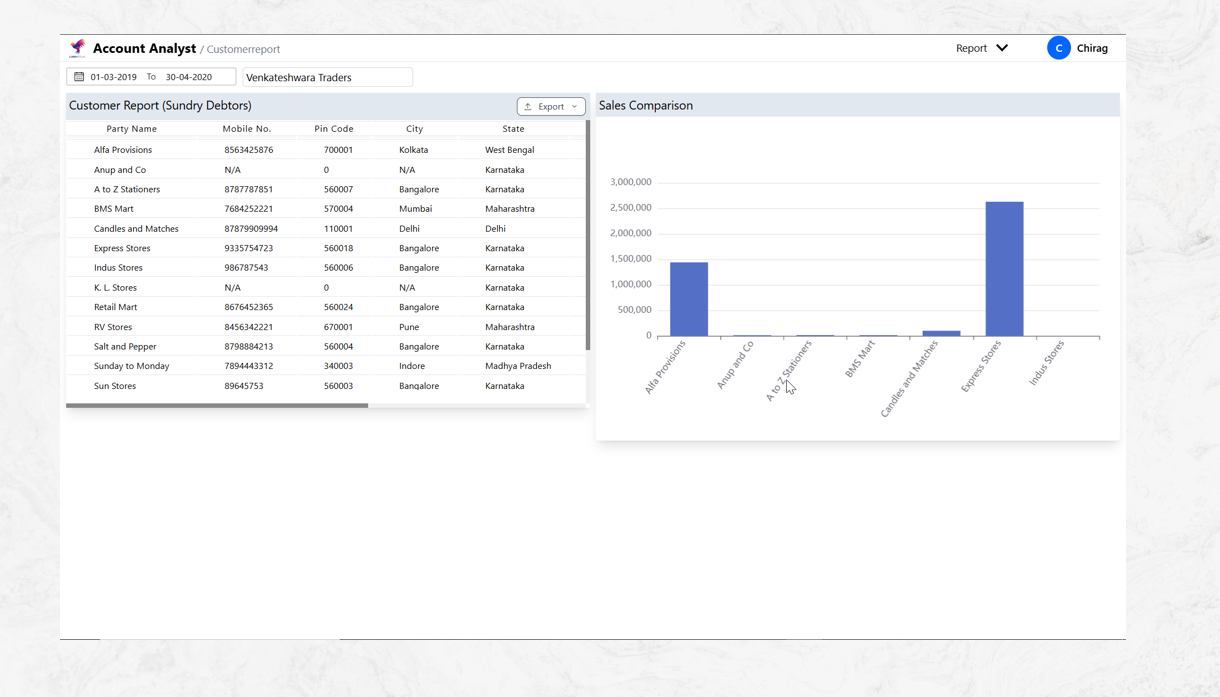
Customer Report

Improved Customer Satisfaction

  • Identifies customer pain points and preferences
  • Helps businesses tailor products/services to meet customer needs
  • Enables proactive resolution of complaints

Better Marketing & Sales Strategies

  • Identifies high-value customers for targeted campaigns
  • Measures effectiveness of promotions and discounts
  • Helps optimize sales funnels based on customer behavior

Operational Efficiency

  • Streamlines customer service by tracking response times
  • Reduces costs by focusing on high-impact customer segments
  • Enhances workforce productivity with actionable insights

Financial Growth

  • Increases revenue by improving customer lifetime value (CLV)
  • Reduces customer acquisition costs (CAC) through retention
  • Identifies upsell and cross-sell opportunities

Compliance & Risk Management

  • Ensures adherence to data protection regulations (e.g., GDPR)
  • Mitigates risks by monitoring customer complaints
  • Provides audit trails for customer interactions

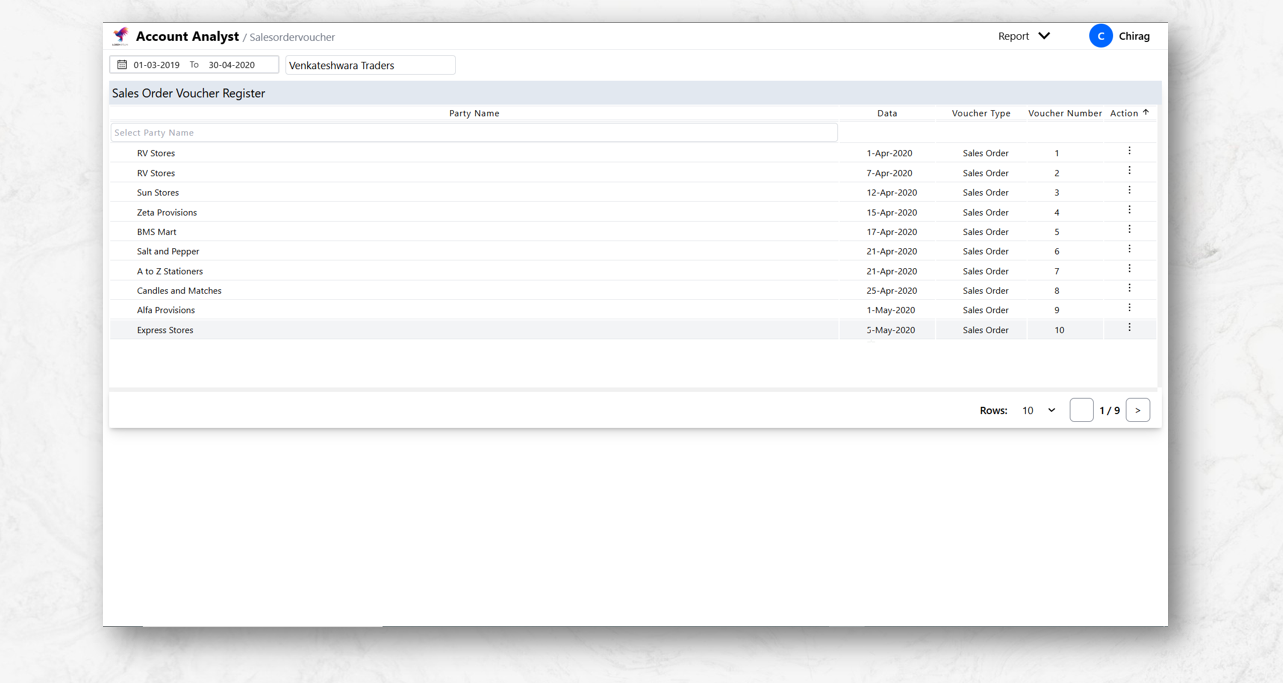
Sales Order voucher

Reduces Errors

Minimizes order processing mistakes with standardized documentation and automated validation checks.

Inventory Management

Provides data for accurate demand forecasting and optimal inventory control to prevent stockouts or overstocking.

Customer Experience

Enhances satisfaction through real-time order tracking, accurate fulfillment, and transparent communication.

Video Description

Account Analyst demo

our Account Analyst software was desine to analysis you sales and purchases report, data, revenue. The system tracks key metrics and generates comparative reports for business decision-making.

Account Analyst Mobile View demo

Our Account Analyst software is designed to analyze your sales and purchases reports, revenue trends, and key metrics in real time. It helps generate detailed comparative reports for strategic decision-making and business growth.

05:14 PM

Testimonials

  • Rizeware
  • Disney
  • Airbnb
  • Worker
  • sunshine
  • JAutomation
  • Vishal Sales
  • Rizeware
  • Disney
  • Airbnb
  • Worker
  • sunshine
  • JAutomation
  • Vishal Sales
stats

Figures and Facts

Make the most of a world class team and infrastructure

Support 24/7

State of Art Devlopment

18+ Year Devlopment Experience

200+ Happy clients

300+ Designed, Developed & deployed

15+ Technical & Software Engineer